

About Minivoid
Ever been asked “Who are you?” and wished you could give someone a glimpse into your head? Everyone has a mental “void” of things they love, that they believe define them in some way: Albums they’d recommend to anyone, films that stuck with them, lyrics they can’t stop thinking about. Minivoid gives all of that a home, and allows people to share those things with others.
The idea surfaced from a personal desire to have a space like that for myself. I wanted an app that made it easy for me to add media I liked to a board or canvas, without having to copy/paste links and download/upload images from a hundred different places. Tumblr lacked that, Pinterest is too image-focused, and LinkTree is too limiting and simple.
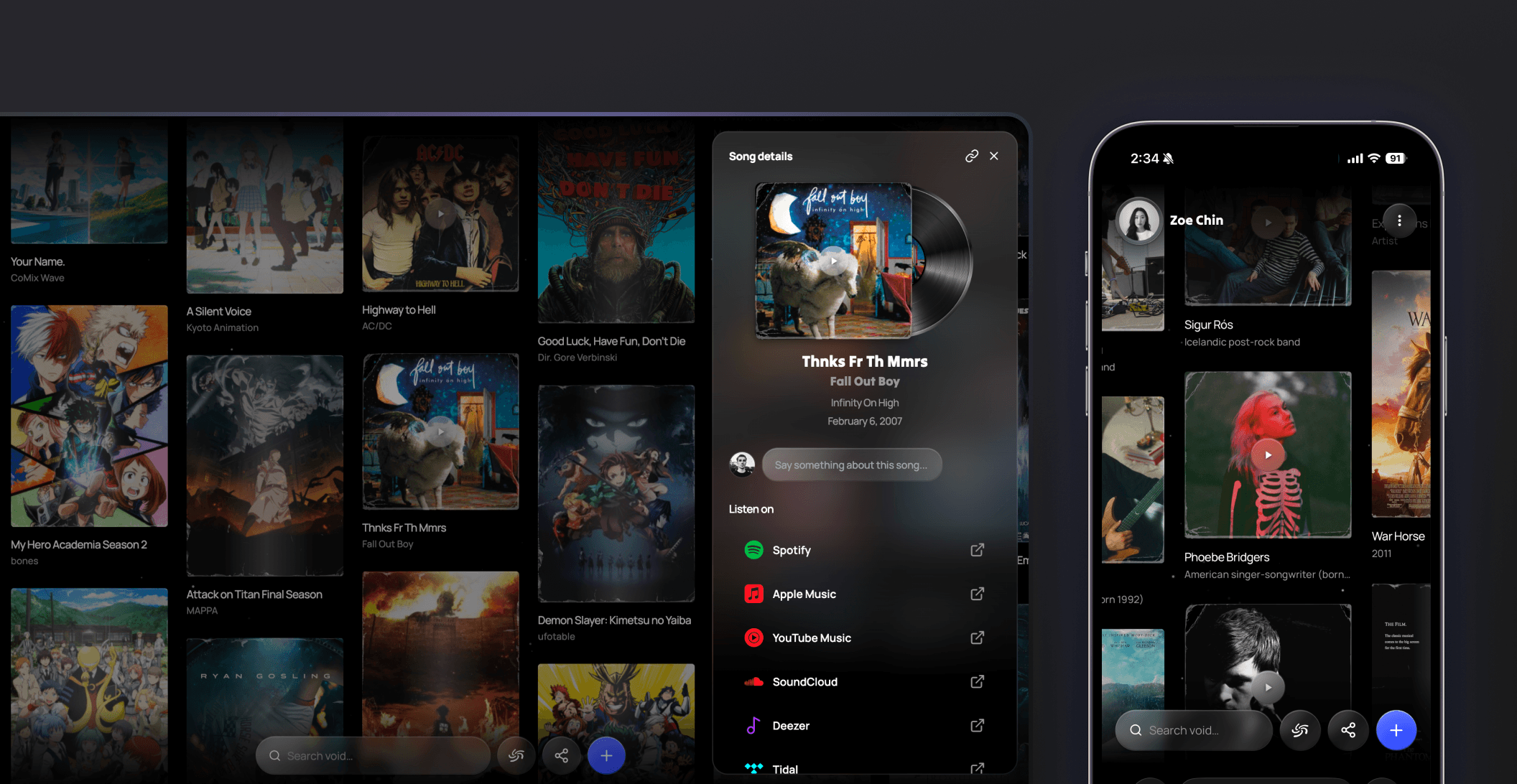
So I designed Minivoid, exactly the way I imagined it. On the surface, Minivoid is a digital space that you can pan around in any direction and fill with media cards: songs, albums, artists, films, games, books, links, and text. On a deeper level, it’s a place where you can digitize and abstract what makes you, you.
A living project.
Minivoid is constantly evolving based on feedback I get, and new ideas that pop into my head. So by the time you’re reading this, chances are, a lot has changed on it.
The response to Minivoid has been incredible, and that energy keeps me iterating. I try my best to juggle building and documenting, but sometimes I fall a little behind on the portfolio updates. So by all means, treat this case study as a snapshot of the thinking behind the work, not a mirror of its current state.
With that being said, I hope you enjoy the read, and I hope you enjoy trying Minivoid out too!


Laying the foundations
To help Replit understand what I envisioned for Minivoid, on top of sending over my designs from Figma, I had to lay the foundations in my initial prompts to make sure the concept and structure was communicated.
A spatial canvas, not a flat list
The board needed to feel like a physical space you move through — not just a feed you scroll through. It needed to feel boundless and gravitational.
Real data from real sources
Users shouldn’t have to upload album artwork or type in movie release dates. Media cards should pull from real databases automatically.
Predefined media types
Media cards needed to cover songs, albums, artists, movies, TV shows, games, books, links, and text. And each of these media types should have its own feel.
Personal, customizable voids
A void belongs to someone. Each user gets a profile with a name, bio, display photo, canvas, and a unique public URL that they can share with others.
How searching for media works on Minivoid
When you search for something in Minivoid, the app quietly checks multiple real-world databases at the same time: Apple’s music and movie catalog, a film database, the Steam and Nintendo game stores for games, Open Library for books, and more.
Results from all of these come back normalized into the same card format, so a song and a movie look consistent even though they come from completely different sources.
For links, I made sure that the app reads whatever preview information the target website publishes and uses that to build the card, grabbing the title, image, and source automatically.

Making the void feel buttery smooth
The void is designed to feel infinite, but making that actually work without the app slowing to a crawl required a few tweaks.
I wanted the void to be infinite, but smooth at the same time. To enable the canvas handle hundreds of cards without performance issues, I prompted Replit to only load the cards currently in the viewport (plus a small buffer around the edges), and keep everything off-screen invisible to the app until you pan toward it.
To make that loading feel even smoother, I prompted it to add appear animations to the cards, having the cards begin from a smaller scale and opacity, and load up to 100% of its scale and opacity when they appear in the viewport.
I also made sure to add momentum to the void, so when you pan the canvas, it coasts to a stop rather than cutting off abruptly. This makes the space feel physical, like something with weight, rather than mechanical.




Testing, perfecting, and testing again
Most of the meaningful design work happened in response to real problems that showed up during building and testing. I got a few of my friends to try the app out before announcing its launch. It turned out that there were some pretty critical issues to address.
Optimizing (and polishing) the media cards.
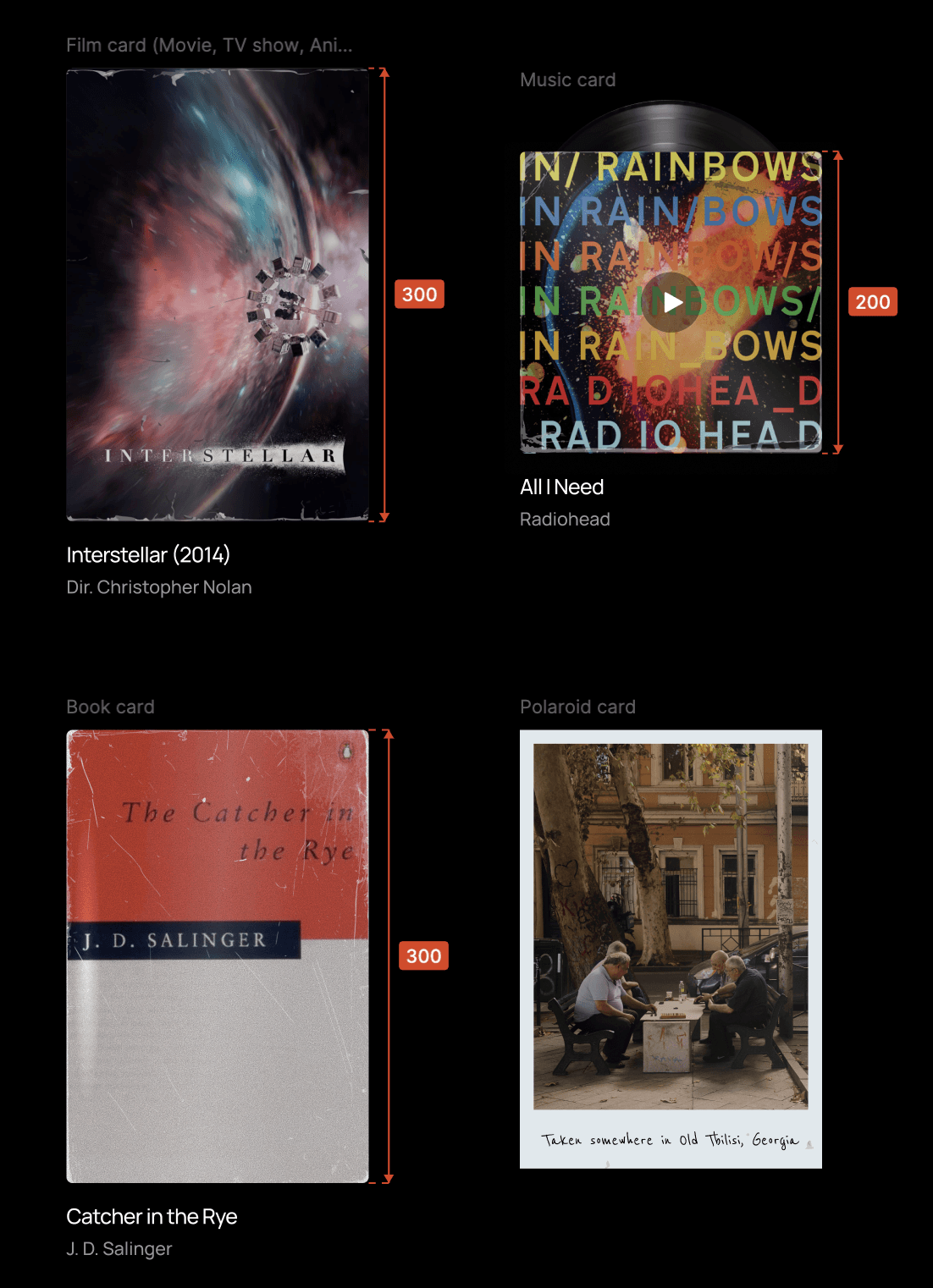
I wanted the canvas to look varied, not too messy and not too structured either. I also wanted the thumbnails to look real.
I defined a fixed width of 200px for all media cards, dynamic heights for cards with dynamic content (like free text), and fixed heights for cards with thumbnails that are likely to be a certain dimension (like movie posters that are likely to be tall and album covers that are likely to be square). Additionally, I had to introduce max heights for the text cards because they can grow really long and mess up the way the canvas looks.
Starting from generic blocks, I turned music thumbnails into vinyls, movie thumbnails into posters, and book covers into hardback books; layering some sheen gradients, shadows, overlays, grain, and fractal noise together to create depth and texture.
Bringing Search-and-add to the surface.
The original “Add media” flow presented four options (Search, Link, Upload, Text) as equal choices that would bring the user to their preferred method of adding media. Getting to search (which I learned most of my friends were doing) took two taps, which is a little frustrating.
I redesigned the Add media bottom sheet to bring all four options into a single page with a tab bar, with search as the default active tab. This made the path from “I want to add something” to “it’s on my canvas” one tap shorter.

Allowing instant playback of music on the void.
Photo uploads: From boring to styled.
Uploaded photos were initially generic blocks, which was boring. I wanted to add a bit of fun to it, so I asked myself “What would the best or most distinct physical form of a photo be?”. A Polaroid and photo paper popped up in my head. That’s when I decided to introduce styling options to photo uploads.
The flow is simple. When the user is on the Upload tab on the Add media sheet, they can either choose to upload their photo regularly, on a Polaroid, or on Paper. Each of these styles would have their own distinct looks, and a user should be able to switch between them if they change their minds.
Just like I did for the other media types, I added texture overlays and shadows to bring out the realism on the photo styles, and for the Polaroid, fade in animations that mimicked real instant photos while they are developing.
Searching episodes, instead of just TV shows.
Initially, the search function only surfaced TV shows as a whole. For example, you could find The Sopranos but not a specific episode from The Sopranos.
I decided to add a second search layer for episodes because I wanted to add the episode S4E4 of Black Mirror - “Hang the DJ” to my void, but couldn’t find it through search. I imagined there were others like me who have favorite episodes from certain shows that they would love to add to their void.
So I made sure the search feature fetched the full episodes list of each TV show (including the episode thumbnail, episode title, season and episode number) from OMDb, and enabled adding specific episodes to the void.
Wormholes: A fun way to connect users with one another.
One of the earliest bits of friction I noticed was how hard it was to revisit someone else’s void. URLs were long, default UID slugs were a string of random numbers, and naturally, links we send to each other get buried under new messages and scattered across different communication channels.
Finding a friend’s void felt like a scavenger hunt every time, and wormholes was my answer to that problem.
Instead of memorizing or re‑finding URLs, Person A can visit Person B’s void and send a wormhole request. When Person B accepts, they’re now linked inside each other’s wormhole lists. From then on, revisiting a friend’s void is as simple as clicking their name. No more copy‑pasting or digging through old messages. Just an instant jump across space.
I framed these connections as wormholes rather than friends on purpose. The metaphor fit into the Minivoid universe while avoiding the expectations and complexity of a full social graph.
Under the hood, it’s essentially a lightweight mutual connection model. But to the user, it feels like opening portal between two voids in the universe, which is much more delightful than just “bookmarked links” or “people you’ve added”.
Thumbnail customization for aesthetic control freaks (like me).
I implemented a feature to enable switching out the default thumbnails on media cards, so users are no longer stuck with whatever image gets pulled in automatically.
If the default poster for a film fits a bit awkwardly on your void, or if the album artwork of your favorite song isn't quite the vibe you're going for, you can now swap it out for a different image from different sources on the web. I've also included abstract and texture photos from Unsplash for people who prefer a minimalist look.
This works for music covers, movie or TV show posters, and book covers.
Letting people copy their void links from the browser address bar.
Initially, if a user copied their void link from their browser’s address bar (/board) and shared it with a friend, their friend would land on the landing page instead of their void. They had to use the copy link buttons to copy their actual void link (/board/theirslug).
I noticed that although I had multiple entry points on the void for copying void links, most users were instinctively copying their URL from the address bar instead. I had to do something about this.
With the help of Claude and Replit agent, I was able to find a workaround by making the URL the same for everyone (both owner and visitor), and letting the app decide what components to render based on who’s logged in.
Now, the backend first checks ownership, and then renders owner-view components or visitor-view components (depending on whether the person viewing the void is the owner or a visitor), allowing users can freely copy their void links right from their address bar.

Exploring the 3D realm for realism and immersion.
Since its launch, I've taken Minivoid through many rounds of iteration. I'm doing my best at (and more importantly, having fun with) creating the best experience for my users. Currently, I'm experimenting with a more immersive experience with 3D elements and effects with GSAP, WebGL, Three.js, and more.
Thankfully all this hassle lead to a beautiful void
After the painful back and forth between me and Replit, Google Admin Console, and Supabase, Minivoid is now live at minivoid.space! 🎉 Create your void, visit someone else’s, and shout if you come across anything unexpected.
Reflections
This short project that lasted 3 days taught me a lot. Because I had full ownership over the product, I had no choice but to pay attention to the details and be intentional about my decisions. Here’s what I’ve learned from building Minivoid.
The most-used feature deserves the least friction.
The original add media flow buried search behind an extra tap. Search is what people do 90% of the time — and I’d designed it as if it was equal to everything else. The solution was obvious in hindsight. Of course most people would prefer the easier way to find something (by searching) over the longer way (manually uploading or pasting a link).
Some user habits and behavioral patterns are worth accommodating.
Just sprinkling “Copy link” buttons on the interface didn’t stop users’ habit of copying links from the address bar. Some user habits are worth trying to change, but this one in particular wasn’t. Most people instinctively copy URLs from address bars, because that works for most sites. I was the outlier, and there was no reason to push back on it.
Making changes to the routing to accommodate for people who are used to copying links from their address bar was lesson about meeting users where they are.
Small polish details matter.
The tiny details that frustrate are worthy of attention. A friend brought up that it was a little annoying that the Add media bottom sheet was closing every time he added something to the void. This was something I saw as worth fixing because I could see others feeling the same way, especially at the beginning of their journey when they are first populating their void.
In the same way, small details that delight are equally as important. The momentum on the canvas (that little coast-to-a-stop when you release a drag) wasn’t strictly necessary. The product works without it. But it’s the thing people notice.“It’s so smooth!” was one of the first few comments I repeatedly received while my friends were trying Minivoid out for the first time. These responses validated the love I have for quality and beauty.
© Zoe Chin 2026